Before you touch a campaign, budget, or audience, get one thing right: does Meta actually know when someone buys something on your site? If the answer is "mostly" or "I think so," everything you do afterwards — optimisation, scaling, creative testing — is built on bad data. This lesson is about closing that gap first.
Why this is lesson one
Meta's ad delivery algorithm learns from the events your pixel reports back. If it's under-reporting purchases, over-reporting them, or reporting them with a long delay, the algorithm optimises toward the wrong signal. You can have perfect campaign structure and great creative and still get poor results, because the system is chasing a distorted picture of what's actually converting.
This is also the single most common issue we see when auditing accounts — not creative fatigue, not bad targeting, but tracking that's quietly broken and nobody noticed because the ads are still "running."
The three places tracking breaks
1. The pixel isn't on every page it needs to be. It's easy to add the base pixel to your homepage and forget checkout or the confirmation page — the two pages that matter most for a Purchase event.
2. Events fire but with the wrong values. A Purchase event that fires without a value and currency parameter still counts as a conversion, but Meta can't optimise for value-based bidding, and your ROAS numbers in Ads Manager will be meaningless.
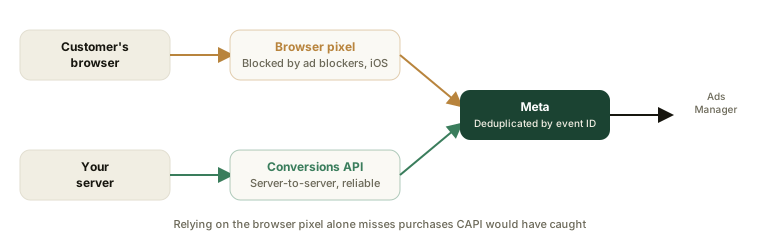
3. Browser-side tracking alone is unreliable. iOS 14.5+ and ad blockers mean a meaningful share of real purchases never make it back to Meta through the browser pixel alone. This is what Conversions API (CAPI) exists to fix — a server-to-server event that doesn't depend on the customer's browser cooperating.
A five-minute check
- Open Events Manager in Meta Business Suite and look at your pixel's event history for the last 7 days.
- Compare the Purchase count against your actual order count for the same period (from Shopify, WooCommerce, or your order system).
- If Meta is reporting fewer than ~85% of your real purchases, you have a tracking gap worth fixing before you scale spend.
- Check that Purchase events show a
value— click into a recent event and confirm it isn't blank or0.
If you want this checked automatically instead of doing it by hand, our free pixel checker will scan your site's pixel setup in under a minute.
What "good" looks like
- Purchase, and ideally AddToCart and InitiateCheckout, all firing with value and currency.
- Conversions API connected alongside the browser pixel, not instead of it — they deduplicate automatically when both are set up correctly with the same event ID.
- Event Match Quality score in Events Manager above 6.0 (Meta grades how well it can match events to a real person — higher means better optimisation).
Get this right first. Every lesson after this one assumes your account is telling Meta the truth about what's converting.